Nutshell Overview of NoteWeaver
o 128 possible MIDI input channels:
That can be directed into any of 8 layers of what's called KDG (Keyboard, Drum, Guitar) tables
:
Keyboard x 8 Layers
Drums (or other input controllers x 8 Layers
Guitar x 8 Layers
o 256 MIDI output channels
o 256 sets, called "KDG Maps," of Keyboard, Drum, and Guitar data. All data is collected into each map and change when maps change. Each layer of each map contains its own initial scale and transposition settings.
You weave in and out of these KDG Maps as you play by selecting new maps, on the fly. This way you can entirely alter how your playing is interpreted and translated.
o 38, or so different functions
These are
assignable to each keyboard or guitar input note event. A note event is a MIDI input note that triggers a Function. An event may play a note, or trigger a host of other functions. They may generate intervals, trigger elaborate chords, switch various maps, and many other things.
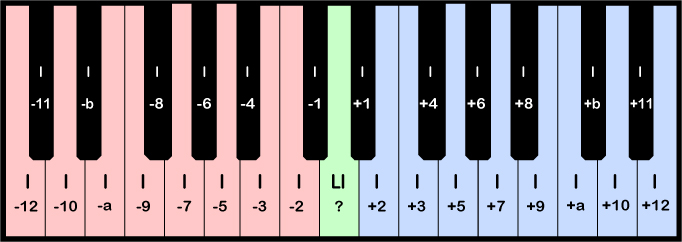
o Individual offsets applied to each function.
These offsets are usually in number base 12 since there are 12 semitones per octave:
. . . -3 -2 -1 0 1 2 3 4 5 6 7 8 9 a b 10 11 12 13 . . .
This also helps you vertically line up digits during editing. For example, a note of 46 will be 2
octaves below a note of 66. An offset of -30 will produce a -3 octave offset as an interval offset choice.
o 256 programmable chords:
Chords can contain up to 32 individual notes and are edited using a quick, intuitive editing grid.
The Chord Notes environment lets you choose the note output sequence. The chord note order is the same
as they are entered on the grid. The Chord Notes environment lets you place notes on the grid in
any musical Key you're comfortable with, and NoteWeaver makes the relative translation.
o 256 programmable chord synth assignments:
Using the Chord Synths screen, each chord can be sent to 16 synths, selectable from the group of 256.
You custom prioritize each note by synth to speed up chord output.
By playing 1 note, you can produce up to 512 total notes sent to 16 synths. This event that creates
512 notes is recorded in a song file as only 6 bytes. However, the final industry standard MIDI compatible
file that is generated contains all 512 notes of information. The reason for the difference in size is
that the internal song feeds the KDG and chord tables to produce the final output.
o 256 mappings of sets of 256 channels of output synth configuration.
o 256 programmable scales that map all 128 MIDI final output notes ranging from 0 - 127 into 128 selectable notes.
o Sequencer made up of the Tracks window. The sequencer helps you record and edit multiple tracks
of NoteWeaver events. The events take up little data since during playback they feed back through
the arrays of NoteWeaver tables.
o Score screen that displays music notation for 20 groups of 6 synths, each of final output.
|